Production Monitoring System
A shop-floor system for tracking production orders, machine time and downtime as they happen.
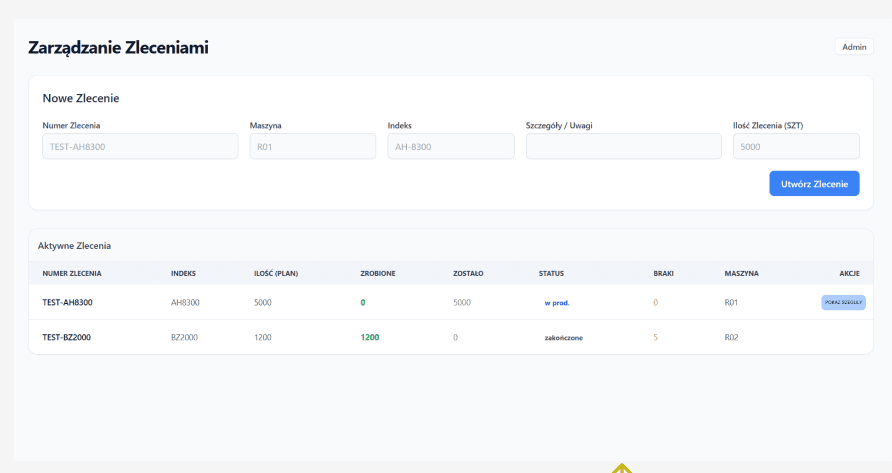
Creating a production order
Planning enters the order number, machine, index, quantity and any notes. The new order drops into the active list below, where done, remaining, defects and status keep updating themselves as operators report from the machines.
Pick a stage above, or use the arrows to walk through the whole flow.
A production monitoring system I designed end to end for the same manufacturing company, from the process model and the data behind it to every screen. It splits into two worlds: a desktop panel where planning creates orders and watches them progress, and a touch terminal standing at each machine, where the operator logs in with an RFID card and reports the work without a keyboard. Everything an operator does is written back as a record: start, stop, downtime reason, defects, finished quantity. That is why the management panel always shows the real state of the floor. The screens below walk through the whole flow.
- Two interfaces on one data model: a management panel and a touch terminal at the machine
- RFID card login, with no usernames, passwords or keyboard on the shop floor
- Live per-order counters: ordered, done, remaining and defects
- Separate work-time and downtime clocks, with a mandatory reason behind every stop
- Downtime reasons chosen from a fixed list, so stops become comparable data
- Full-size numeric keypads for defect and finished quantities, usable in work gloves
- Every operator session lands in a register: who, which order, which machine, how long
- A master table rolling the register up into order status, machine time and downtime